","image":["/images/sgsmartpawshop.shop/images/product/skymee-petalk-ai-ii-dog-camera-automatic-treat-dispenser-1.jpg","/images/sgsmartpawshop.shop/images/product/skymee-petalk-ai-ii-dog-camera-automatic-treat-dispenser-2.jpg","/images/sgsmartpawshop.shop/images/product/skymee-petalk-ai-ii-dog-camera-automatic-treat-dispenser-3.jpg","/images/sgsmartpawshop.shop/images/product/skymee-petalk-ai-ii-dog-camera-automatic-treat-dispenser-4.jpg","/images/sgsmartpawshop.shop/images/product/skymee-petalk-ai-ii-dog-camera-automatic-treat-dispenser-5.jpg","/images/sgsmartpawshop.shop/images/product/skymee-petalk-ai-ii-dog-camera-automatic-treat-dispenser-6.jpg"],"sku":"skymee-petalk-ai-ii-dog-camera-automatic-treat-dispenser","brand":{"@type":"Brand","name":"1st Pet Tech Store In Singapore"},"offers":{"@type":"AggregateOffer","lowPrice":39.4,"highPrice":39.4,"priceCurrency":"USD","availability":"https://schema.org/InStock","url":"https://sgsmartpawshop.shop/products/skymee-petalk-ai-ii-dog-camera-automatic-treat-dispenser","offerCount":1}}
Skymee Petalk AI II Pet Camera Automatic Pet Treats Dispenser
1 / 6
+1
Skymee Petalk AI II Pet Camera Automatic Pet Treats Dispenser
SKYMEE Petalk AI II Pet Camera Automatic Pet Treats Dispenser
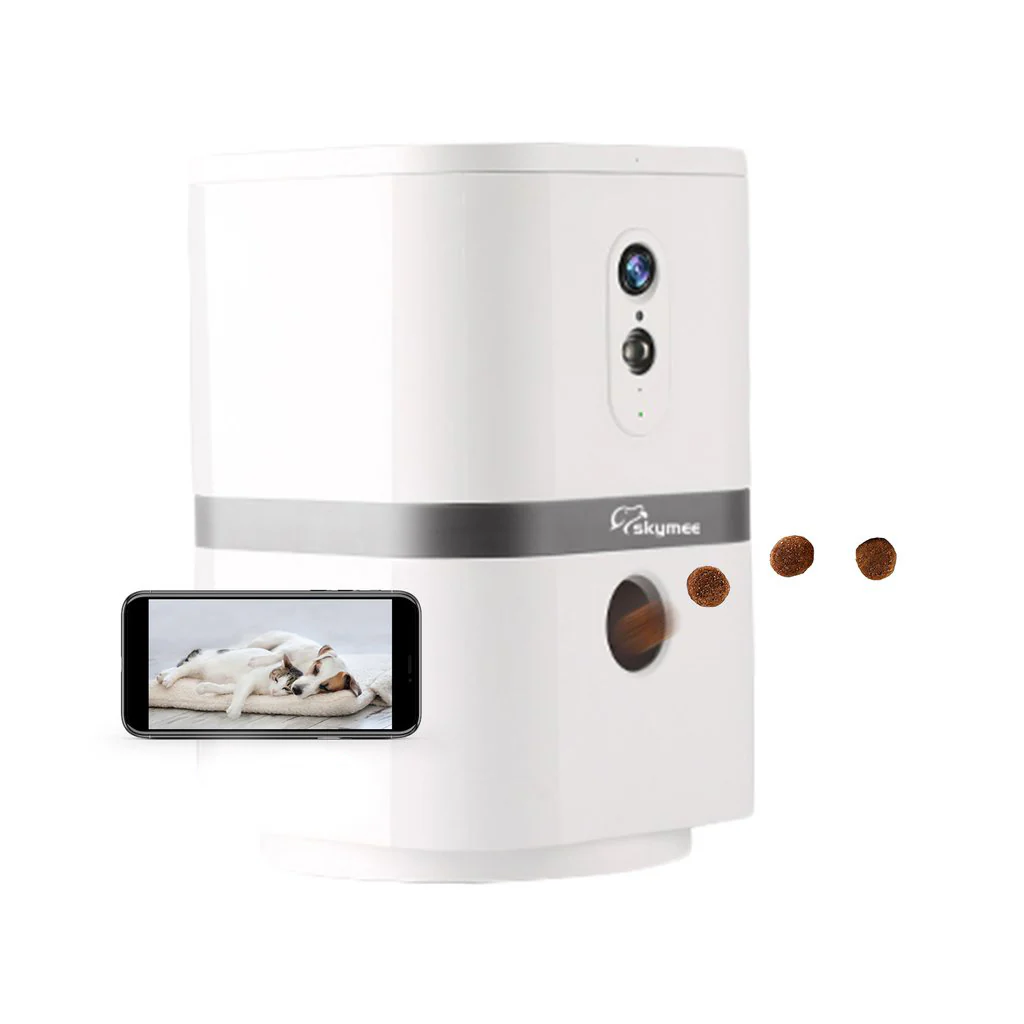
Stay connected with your pet anywhere, anytime! Introducing the Petalk AI II pet camera, our very own alternative from Furbo Pet camera with better pricing and superior features!
Why choose the Petalk AI II Pet Camera Automatic Treat Dispenser Instead?
SEE+ 1080p Full HD Camera: With Full HD, 4x zoom, 180°pan and night vision, you will be able to see your fur baby from anywhere.
PLAY+ Happy Treat Dispenser: Fill your pet’s favorite treats (4mm~17mm) and toss it manually or by auto timer. Let your pet enjoy treats anytime.
TALK+ 2-Way Audio: Petalk AI II will notify you when your pet moves around by motion detection. Know what’s going on at home and keep your dog calm via audio.
MORE+ Wireless charging for Qi-enabled device. Compatible with TF card (not included) to record video automatically and Alexa voice control.
APP+ Skymee app is fully free with no extra cost. One app account can allow up to 8 mobile devices to login at the same time. Share live video to your family members. Contact technical support at any time via the app.
Suitable for both dogs and cats
Skymee Petalk AI II Pet Camera Product Features
Higher-definition camera with 4 resolution options. Clearer microphone with lesser background noise. Wider field of vision with 180° rotation pan. Night vision with auto & manual turns on/off.
Photo and Video, one-click sharing
Two-way audio, let your presence be felt by your pet
Infrared LED Night Vision
Real-time video, history recording
You can interact with your pet
Take a snapshot and share your cute pet pics on your social media accounts
Comes with night vision camera for more visibility when you are working late
Smart motion detector tells you when your pet is moving around at home
Suitable for different treat sizes and can be used as a wireless charger
4 Simple Steps To Set Up
Power on the device (Type-C USB cable) and download Skymee App.
Open the Skymee app and register an account. Hold the SET button for 5s.
Add the Petalk AI II device and enter your WIFI password correctly.
Show the QR code on your phone to the camera. Keep a small distance (about 5-10cm). When you hear the “beep” sound, click Next and you’re all set to go!
Multi-User Access: Shared Joy is Double Joy
You can log in your app account on other people’s mobile phones, or, you can share access to the pet camera with your family members. This allows more users to talk to your pet and treat them when you are busy.
How To Connect With Other Phones?
After you connect your phone to the Petalk AI II Pet Camera under Wifi, set up a password for your app account via My Account > Security > Set Password.
Your family and friends can log in to your account on their phones by entering the password you provided.
Advanced Privacy Protection
When someone has signed into your account, the Skymee device light will turn blue. This indicates that there are people watching through the camera.
To revoke access, just change your account password and others will not be able to log in.
SPECIFICATIONS
Camera: 1080P Full HD with 4 Resolutions Range: 180° Rotation Pan & 4X Zoom Modes: App Manual Control / Auto Treat Dispenser / Manual Feed Button Input: Type-C USB Cable Dimensions: 15cm x 15cm x 27cm (H) Weight: 1.2kg
Compare
SKYMEE Petalk AI II Pet Camera Automatic Pet Treats Dispenser
Stay connected with your pet anywhere, anytime! Introducing the Petalk AI II pet camera, our very own alternative from Furbo Pet camera with better pricing and superior features!
Why choose the Petalk AI II Pet Camera Automatic Treat Dispenser Instead?
SEE+ 1080p Full HD Camera: With Full HD, 4x zoom, 180°pan and night vision, you will be able to see your fur baby from anywhere.
PLAY+ Happy Treat Dispenser: Fill your pet’s favorite treats (4mm~17mm) and toss it manually or by auto timer. Let your pet enjoy treats anytime.
TALK+ 2-Way Audio: Petalk AI II will notify you when your pet moves around by motion detection. Know what’s going on at home and keep your dog calm via audio.
MORE+ Wireless charging for Qi-enabled device. Compatible with TF card (not included) to record video automatically and Alexa voice control.
APP+ Skymee app is fully free with no extra cost. One app account can allow up to 8 mobile devices to login at the same time. Share live video to your family members. Contact technical support at any time via the app.
Suitable for both dogs and cats
Skymee Petalk AI II Pet Camera Product Features
Higher-definition camera with 4 resolution options. Clearer microphone with lesser background noise. Wider field of vision with 180° rotation pan. Night vision with auto & manual turns on/off.
Photo and Video, one-click sharing
Two-way audio, let your presence be felt by your pet
Infrared LED Night Vision
Real-time video, history recording
You can interact with your pet
Take a snapshot and share your cute pet pics on your social media accounts
Comes with night vision camera for more visibility when you are working late
Smart motion detector tells you when your pet is moving around at home
Suitable for different treat sizes and can be used as a wireless charger
4 Simple Steps To Set Up
Power on the device (Type-C USB cable) and download Skymee App.
Open the Skymee app and register an account. Hold the SET button for 5s.
Add the Petalk AI II device and enter your WIFI password correctly.
Show the QR code on your phone to the camera. Keep a small distance (about 5-10cm). When you hear the “beep” sound, click Next and you’re all set to go!
Multi-User Access: Shared Joy is Double Joy
You can log in your app account on other people’s mobile phones, or, you can share access to the pet camera with your family members. This allows more users to talk to your pet and treat them when you are busy.
How To Connect With Other Phones?
After you connect your phone to the Petalk AI II Pet Camera under Wifi, set up a password for your app account via My Account > Security > Set Password.
Your family and friends can log in to your account on their phones by entering the password you provided.
Advanced Privacy Protection
When someone has signed into your account, the Skymee device light will turn blue. This indicates that there are people watching through the camera.
To revoke access, just change your account password and others will not be able to log in.
SPECIFICATIONS
Camera: 1080P Full HD with 4 Resolutions Range: 180° Rotation Pan & 4X Zoom Modes: App Manual Control / Auto Treat Dispenser / Manual Feed Button Input: Type-C USB Cable Dimensions: 15cm x 15cm x 27cm (H) Weight: 1.2kg
Compare
$39.40
Original: $131.34
-70%
Skymee Petalk AI II Pet Camera Automatic Pet Treats Dispenser—
$131.34
$39.40
Description
SKYMEE Petalk AI II Pet Camera Automatic Pet Treats Dispenser
Stay connected with your pet anywhere, anytime! Introducing the Petalk AI II pet camera, our very own alternative from Furbo Pet camera with better pricing and superior features!
Why choose the Petalk AI II Pet Camera Automatic Treat Dispenser Instead?
SEE+ 1080p Full HD Camera: With Full HD, 4x zoom, 180°pan and night vision, you will be able to see your fur baby from anywhere.
PLAY+ Happy Treat Dispenser: Fill your pet’s favorite treats (4mm~17mm) and toss it manually or by auto timer. Let your pet enjoy treats anytime.
TALK+ 2-Way Audio: Petalk AI II will notify you when your pet moves around by motion detection. Know what’s going on at home and keep your dog calm via audio.
MORE+ Wireless charging for Qi-enabled device. Compatible with TF card (not included) to record video automatically and Alexa voice control.
APP+ Skymee app is fully free with no extra cost. One app account can allow up to 8 mobile devices to login at the same time. Share live video to your family members. Contact technical support at any time via the app.
Suitable for both dogs and cats
Skymee Petalk AI II Pet Camera Product Features
Higher-definition camera with 4 resolution options. Clearer microphone with lesser background noise. Wider field of vision with 180° rotation pan. Night vision with auto & manual turns on/off.
Photo and Video, one-click sharing
Two-way audio, let your presence be felt by your pet
Infrared LED Night Vision
Real-time video, history recording
You can interact with your pet
Take a snapshot and share your cute pet pics on your social media accounts
Comes with night vision camera for more visibility when you are working late
Smart motion detector tells you when your pet is moving around at home
Suitable for different treat sizes and can be used as a wireless charger
4 Simple Steps To Set Up
Power on the device (Type-C USB cable) and download Skymee App.
Open the Skymee app and register an account. Hold the SET button for 5s.
Add the Petalk AI II device and enter your WIFI password correctly.
Show the QR code on your phone to the camera. Keep a small distance (about 5-10cm). When you hear the “beep” sound, click Next and you’re all set to go!
Multi-User Access: Shared Joy is Double Joy
You can log in your app account on other people’s mobile phones, or, you can share access to the pet camera with your family members. This allows more users to talk to your pet and treat them when you are busy.
How To Connect With Other Phones?
After you connect your phone to the Petalk AI II Pet Camera under Wifi, set up a password for your app account via My Account > Security > Set Password.
Your family and friends can log in to your account on their phones by entering the password you provided.
Advanced Privacy Protection
When someone has signed into your account, the Skymee device light will turn blue. This indicates that there are people watching through the camera.
To revoke access, just change your account password and others will not be able to log in.
SPECIFICATIONS
Camera: 1080P Full HD with 4 Resolutions Range: 180° Rotation Pan & 4X Zoom Modes: App Manual Control / Auto Treat Dispenser / Manual Feed Button Input: Type-C USB Cable Dimensions: 15cm x 15cm x 27cm (H) Weight: 1.2kg